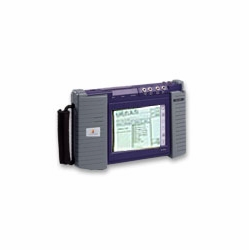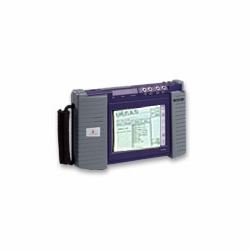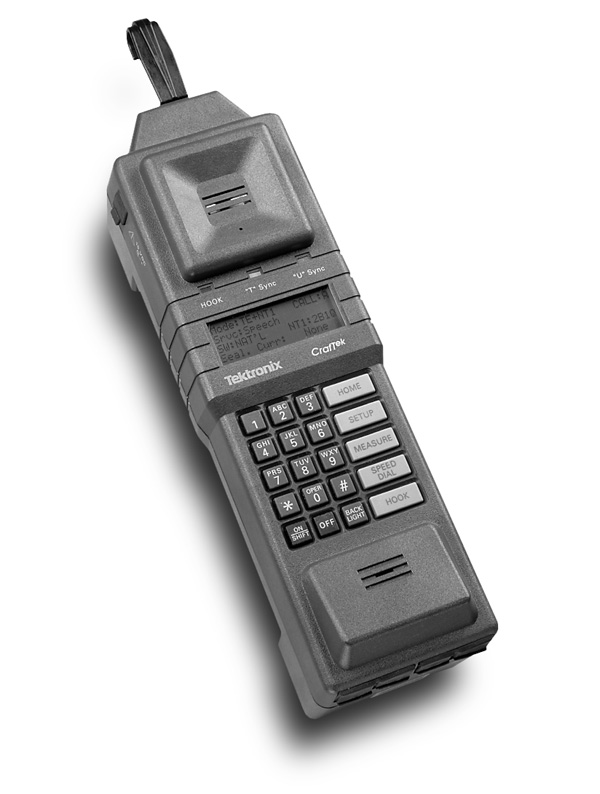
TEKTRONIX CT100 CRAFTEK ISDN TEST SET REPAIRED
Available*
Item # 25405000
Model # CT100
$945.00
 financing available. Learn More
* Notes on Availability:
(Images may not be of the actual item being sold.)
- Product Description
- You Might Also like
- Recently Viewed
Generic
Class
Group
Type
Manufacturer
LOT
TEST ISDN
Test Equipment
Transmission Testing
T-1 Wideband
Tektronix
 Warning: This product can expose you to chemicals, which are known to the State of California to cause cancer and birth defects or other reproductive harm. For more information, go to www.P65Warnings.ca.gov
Product Description
TEKTRONIX CT100 CRAFTEK ISDN TEST SET REPAIRED Subscriber Loop Portable Test Set CrafTekTM CT100 * Opt. 2A * Opt. 3B Features Craft Tool for Subscriber Loop Installation and Maintenance ISDN Basic Rate POTS/CLASS P-Phone EBS Rugged, Light-weight, Battery Operation ISDN Service Verification Call Setup Protocol Decode Automated BER Testing Dual Simultaneous Call Control NEBEs, FEBE Sealing Current P-Phone EBS Verification Signaling Channel DC Voltage Call Appearance and Feature Verification Speakerphone Output Internet Access Testing Personal Video Conferencing Telecommuting Applications Telephony ISDN Performance PC Communication Subscriber Loop Portable Test Set CrafTek CT100 The CrafTek Subscriber Loop Test Set is designed to meet the changing needs of the telephony craftsperson, with flexibility to handle rapidly evolving and increasingly sophisticated digital technologies.
The CrafTek CT100 allows today's work force to troubleshoot problems in the subscriber loop, without retraining. An easy-to-understand human interface, backed by a self-prompting, plain English display featuring extensive error messaging, allows the instrument to be put to work within minutes.
As the craftperson's primary installation and maintenance tool, the CrafTek CT100 meets high standards for ruggedness, portability and reliability. In addition to traditional analog POTS service, the portable test set provides comprehensive ISDN and P-Phone measurements and indicators for rapid performance verification and fault diagnosis. New services can be provided more efficiently, customer downtime minimized and problems quickly resolved using the CrafTek CT100 servicing solution.
The CrafTek CT100's Home screen displays the current instrument operating mode. The word "LOG" indicates that data logging has been enabled.
CrafTek CT100 RS-232 Serial Interface Troubleshooting Opt. 2A The CrafTek CT100's RS-232 interface (Opt. 2A) allows the user to connect an external device to the portable test set over a serial interface. This option provides for two capabilities when in use. The first is data sourcing, providing enhanced testing of ISDN D-channel packet data capabilities. The other capability is data logging, allowing the user to record results of installation and troubleshooting tasks.
Packet Data Testing Over RS-232 In the data sourcing mode, the RS-232 interface allows the user to connect a terminal and initiate X.25 packet-switched data calls over an ISDN data channel. This mode is useful when accessing packet gateways requiring more than a simple phone number (e.g., passwords) or to more fully verify D-channel user applications.
The operator connects their computer's serial interface to the unit's auxiliary jack (DB25-to-RJ45 adapters included). A PC communications software package can then be used to send standard Hayes-compatible modem commands to setup and maintain a D-channel packet call.
D-Channel Monitor In the data logging mode, the user can use the RS-232 port to connect a printer or terminal directly to the unit. Details such as call setup, signaling protocols and measurement results can be recorded for later analysis. Figures 1 and 2 provide examples of the type of information available when operating in the data logging mode. This mode of operation allows the user to monitor the events that are taking place on the D Channel.
For instance, the CrafTek CT100 might be used to monitor a line over an extended period, recording time-stamped events such as synchronization loss or data transmission errors. A problem call could be documented from call setup to teardown to trace CPE or switch-related trouble, in the absence of more complex protocol analyzers. Or the technician may simply use the data logging mode to record results of the service verification procedures when on-site.
The CrafTek CT100 allows today's work force to troubleshoot problems in the subscriber loop, without retraining. An easy-to-understand human interface, backed by a self-prompting, plain English display featuring extensive error messaging, allows the instrument to be put to work within minutes.
As the craftperson's primary installation and maintenance tool, the CrafTek CT100 meets high standards for ruggedness, portability and reliability. In addition to traditional analog POTS service, the portable test set provides comprehensive ISDN and P-Phone measurements and indicators for rapid performance verification and fault diagnosis. New services can be provided more efficiently, customer downtime minimized and problems quickly resolved using the CrafTek CT100 servicing solution.
The CrafTek CT100's Home screen displays the current instrument operating mode. The word "LOG" indicates that data logging has been enabled.
CrafTek CT100 RS-232 Serial Interface Troubleshooting Opt. 2A The CrafTek CT100's RS-232 interface (Opt. 2A) allows the user to connect an external device to the portable test set over a serial interface. This option provides for two capabilities when in use. The first is data sourcing, providing enhanced testing of ISDN D-channel packet data capabilities. The other capability is data logging, allowing the user to record results of installation and troubleshooting tasks.
Packet Data Testing Over RS-232 In the data sourcing mode, the RS-232 interface allows the user to connect a terminal and initiate X.25 packet-switched data calls over an ISDN data channel. This mode is useful when accessing packet gateways requiring more than a simple phone number (e.g., passwords) or to more fully verify D-channel user applications.
The operator connects their computer's serial interface to the unit's auxiliary jack (DB25-to-RJ45 adapters included). A PC communications software package can then be used to send standard Hayes-compatible modem commands to setup and maintain a D-channel packet call.
D-Channel Monitor In the data logging mode, the user can use the RS-232 port to connect a printer or terminal directly to the unit. Details such as call setup, signaling protocols and measurement results can be recorded for later analysis. Figures 1 and 2 provide examples of the type of information available when operating in the data logging mode. This mode of operation allows the user to monitor the events that are taking place on the D Channel.
For instance, the CrafTek CT100 might be used to monitor a line over an extended period, recording time-stamped events such as synchronization loss or data transmission errors. A problem call could be documented from call setup to teardown to trace CPE or switch-related trouble, in the absence of more complex protocol analyzers. Or the technician may simply use the data logging mode to record results of the service verification procedures when on-site.